
Meta advertising in 2025 is smarter, more automated, and more profitable than ever before. With powerful AI optimization, real-time reporting, and unified cross-platform control, it remains a staple for businesses of all shapes and sizes. Whether you’re a solopreneur or a global brand, Meta continues to offer unmatched advertising versatility across Facebook, Instagram, Messenger, and the Audience Network.
How to use Meta Ads Manager starts with understanding its layered structure and advanced controls. In this guide, we’ll walk you through every important stage — from setup to creative to optimization — so you can run campaigns that drive ROI in 2025. Expect clarity, structure, and real performance insights throughout.
Struggling to make Meta Ads Manager work for your business?
AWISEE offers full-service Meta ads setup for beginners and experienced marketers alike.
- Custom campaign setup
- Audience targeting & pixel integration
- Ad creatives and budget optimization

Step 1: Set Up Your Meta Business Account
Before launching your first campaign, you need to create a Meta Business Manager account. This serves as your digital headquarters — where you assign permissions, manage assets, and control billing.
Here’s how to do it:
- Visit business.facebook.com
- Click “Create Account” and log in with your personal Facebook credentials
- Add your business name, email, and connect your Facebook Page
- Under Business Settings, add team members and assign roles
This setup ensures you’re not only ready to run ads but also fully secured for collaborative workflows and long-term management.
Can I run ads without a Facebook Page?
No. Even if you only advertise on Instagram, a Facebook Page is required to create and manage ads. It acts as your brand’s verified identity inside Meta Ads Manager.
Step 2: Access the Meta Ads Manager Interface
Your business account is live — now it’s time to move into Meta Ads Manager, your central hub for campaign creation and performance management.
- Visit: facebook.com/adsmanager
- Use your Business credentials to access the dashboard


This is where campaign architecture happens. You’ll select objectives, set budgets, build ads, and monitor results in real-time. The 2025 update adds more automation, AI-powered audience suggestions, and smarter layout for a smoother experience — making it easier for both pros and first-timers to run efficient campaigns.
Step 3: Define Your Campaign Objective
Every high-performing campaign begins with the right goal. Meta now offers six clearly defined objectives that align with your business funnel.

Choose from:
- Awareness: Reach a wide audience and build familiarity
- Traffic: Drive clicks to your website or app
- Engagement: Get more comments, likes, and shares
- Leads: Capture user information with forms
- App Promotion: Drive installs directly from Instagram or Facebook
- Sales: Push for conversions like purchases or signups
Your selected objective will guide Meta’s delivery strategy, creative structure, and budget pacing.
Most Common Meta Ad Campaign Objectives in 2025

This bar chart shows the distribution of Meta Ads campaign objectives selected by advertisers in 2025. The data indicates that:
- Sales (35%) and Leads (25%) are the most commonly selected objectives.
- These are followed by Traffic (15%), Awareness (10%), App Promotion (8%), and Engagement (7%).
This reflects how Meta has become a strong conversion-oriented platform, especially for eCommerce and service-based businesses.
Step 4: Meta Ads Setup for Beginners
Here’s where things get real — and where beginners often overthink.
Meta ads setup for beginners follows a three-layer structure: Campaign > Ad Set > Ad. Within the Ad Set, you define who sees your ads, where they appear, and how much you’ll spend.
Key things to do at the Ad Set level:
Name your Ad Set smartly (e.g., “USA 18–34, Reels, Retargeting”)
Set up audience targeting by:
- Demographics (age, gender, location)
- Interests (e.g., eco-friendly brands, foodies)
- Lookalike or Custom Audiences


Choose Automatic Placements (recommended) or Manual ones
Define your budget — Daily or Lifetime
Choose campaign schedule (run immediately or set dates)
How Much Does Meta Advertising In 2025 Cost?
There’s no fixed number, but most campaigns begin at $5–$10/day for testing. A more realistic minimum for conversion-focused campaigns is $20–$50/day. Meta’s learning phase optimizes over time, so initial investment helps stabilize cost-per-click and conversion metrics.

Meta Ads Manager tutorial tools help you preview placement views, CPM estimates, and even simulate audience reach.
AWISEE is the Trusted Meta Ads Experts – Backed by Strategy
Looking for best practices for Meta ad campaigns in 2025? AWISEE’s ad specialists design campaigns that align with your goals and Meta’s evolving ad formats.
- Avoid common pitfalls
- Stay up-to-date with Meta’s compliance rules
Get expert help today at awisee.com and stay 100% compliant with Meta advertising policies.
Step 5: Build the Creative That Converts
In 2025, with attention spans shorter than ever, your ad creatives must capture interest instantly. The good news? According to WordStream’s 2025 Facebook Ad Trends, video and carousel formats continue to dominate due to higher engagement and scroll-stopping visuals.
Creative Library Builder

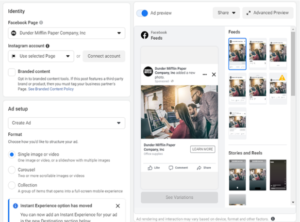
Available formats:
- Image Ads
- Video Ads (the current top performer)
- Carousel Ads (great for product categories)
- Collection Ads (dynamic product showcase)
- Instant Experience (immersive mobile landing page)
Top creative tips:
- Use vertical layout (4:5 or 9:16)
- Keep text concise
- Use motion in the first 3 seconds
- Add subtitles and a strong CTA (e.g., “Book Now”)
Authenticity beats perfection. You don’t need cinematic footage — you need relevance.
Why Working with Facebook and Instagram Ad Management Is a Necessity?
Meta’s biggest advantage is unified cross-platform targeting. You run one ad that shows across Facebook Feed, Instagram Reels, Stories, Marketplace, Messenger, and more.
Here’s what this means for your business:
- Seamless cross-device experience for your audience
- Centralized analytics across platforms
- Cost control with performance prioritization (Meta shows your ad where it works best)
Facebook and Instagram ad management is no longer optional — it’s where most of your customer touchpoints begin.
Learn exactly what works when it comes to Real Estate Facebook Ads: How to Run Ads & Convert in 2025, with tips backed by data.
Best Practices for Meta Ad Campaigns in 2025 You Can’t Ignore
The ecosystem has matured. To compete, you need smarter execution.
These are the habits of top advertisers:
- Use Dynamic Creatives to rotate headlines, visuals, and CTAs
- Refresh ads regularly to avoid audience fatigue
- Install the Meta Pixel (essential for conversion tracking)
- Adopt Campaign Budget Optimization (CBO) to let Meta auto-adjust your spend
- Try Advantage+ targeting for smart AI audience suggestions
Screenshot Placeholder: Advantage+ and Pixel Overview
These best practices for Meta ad campaigns in 2025 can dramatically improve CTRs and ROAS across industries.
Is a Step-by-Step Guide to Meta Ads Manager 2025 Still Needed?
Yes — more than ever!
Even as automation rises, understanding the logic of your campaign structure keeps you in control. AI might do the heavy lifting, but your inputs shape the results.
This step-by-step guide to Meta Ads Manager 2025 isn’t just for beginners — it’s the foundation every business needs to ensure campaigns are built with purpose, not guesswork.
